
Plugin Development
This guide is primarily for developers who need to develop Addax plugins to meet their specific needs.
Addax Flow
The general process for running a task in Addax is as follows:
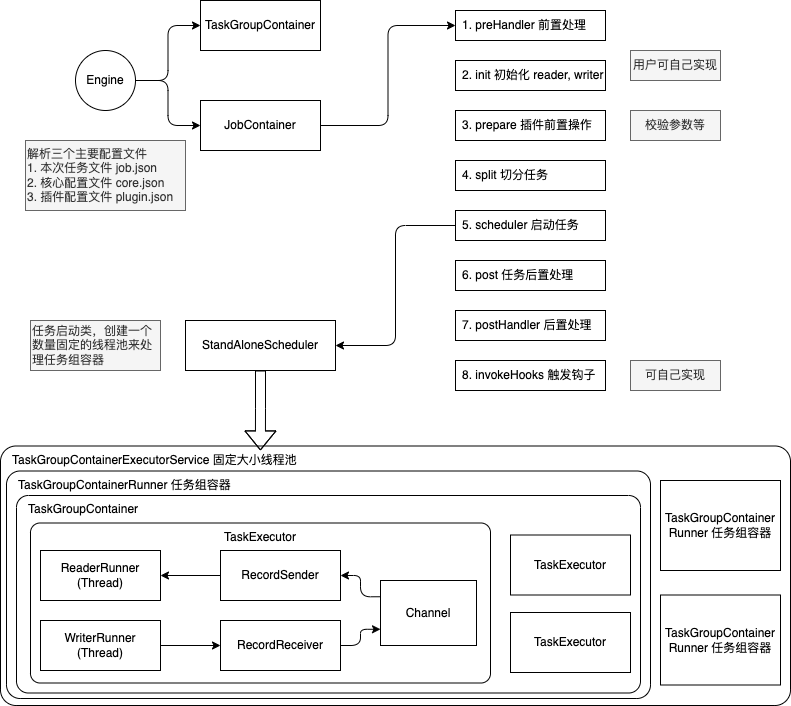
The startup steps are:
- Parse configurations, including
job.json,core.json, andplugin.json. - Set the
jobIdin theconfiguration. - Start the Engine via
Engine.start()to enter the startup procedure. - Set the
RUNTIME_MODEin theconfiguration. - Start via the
JobContainer'sstart()method. - Execute the job's
preHandler(),init(),prepare(),split(),schedule(),post(), andpostHandle()methods in seqence. - The
init()method involves initializing the reader and writer plugins based on the configuration. This includes hot-loading JARpackages and calling the plugin'sinit()method, as well as setting the reader and writer's configuration. - The
prepare()method involves initializing the reader and writer plugins by calling their respectiveprepare()methods. Each pluin has its ownjarLoader, which inherits fromURLClassLoader. - The
split()method adjusts the number of channels viaadjustChannelNumber()and performs the most granular splitting for the reader and writer. It's important to note that the writer's split result must reference the reader's split result to ensure an equal number of splits, satisfying the 1:1 channel model. - The channel count is mainly determined by byte and record rate limiting, which is calculated as the first step in the
split()function. - In the
split()method, the reader plugin will split based on the channel value, but some reader plugins might not use this value. The writer plugin will always split 1:1 based on the reader's splits. - The
mergeReaderAndWriterTaskConfigs()method insidesplit()is responsible for merging the configurations of the reader, writer, and transformer to generate task configurations and override thejob.contentconfiguration. - The
schedule()method allocates and generatesTaskGroupobjects based on the task configurations generated bysplit(). The number of task groups is determined by dividing the total number of tasks by the number of tasks a singleTaskGroupcan support. schedule()is executed internally byAbstractScheduler'sschedule()method, which then callsstartAllTaskGroup()to create allTaskGroupContainers to organize the related tasks.TaskGroupContainerRunneris responsible for running theTaskGroupContainerto execute the assigned tasks. The concrete implementation class for the scheduler isProcessInnerScheduler.taskGroupContainerExecutorServicestarts a fixed thread pool to executeTaskGroupContainerRunnerobjects. Therun()method ofTaskGroupContainerRunnercallstaskGroupContainer.start(), which creates aTaskExecutorfor each channel and starts the task viataskExecutor.doStart().
Plugin Mechanism
To handle the differences between various data sources while providing consistent synchronization primitives and extensibility, Addax uses a Framework + Plugin model:
- Plugins only need to care about reading from or writing to the data source itself.
- Common synchronization issues, such as type conversion, performance, and statistics, are handled by the framework.
As a plugin developer, you need to focus on two issues:
- The correctness of reading and writing data from the specific data source.
- How to communicate with the framework and use it correctly.
Framework from a Plugin's Perspective
Logical Execution Model
Plugin developers don't need to worry about too much; they mainly need to focus on reading from and writing to specific systems, and how their code is logically executed—which method is called and when. Before that, you need to understand the following concepts:
Job: Describes a synchronization job from a source to a destination, representing the smallest business unit of data synchronization. For example, synchronizing a table from MySQL to a table in PostgreSQL.Task: The smallest execution unit, obtained by splitting aJobto maximize performance. For example, aJobreading from a sharded MySQL database with 1024 sub-tables can be split into 1024 readTasks, executed concurrently.TaskGroup: A collection ofTasks. A set ofTasksexecuted within the sameTaskGroupContaineris called aTaskGroup.JobContainer: TheJobexecutor, a work unit responsible for the global splitting, scheduling, pre- and post-statements of aJob. Similar to the JobTracker in Yarn.TaskGroupContainer: TheTaskGroupexecutor, a work unit responsible for executing a group ofTasks. Similar to the TaskTracker in Yarn.
In short, a Job is split into Tasks, which are executed in containers provided by the framework. The plugin only needs to implement the logic for Job and Task.
Programming Interface
So, how should the logic of Job and Task be mapped to specific code?
First, the entry class of a plugin must extend the Reader or Writer abstract class and implement their respective Job and Task inner abstract classes. The implementations of Job and Task must be in the form of inner classes.
public class SomeReader
        extends Reader
{
    public static class Job
            extends Reader.Job
    {
        @Override
        public void init()
        {
        }

        @Override
        public void prepare()
        {
        }

        @Override
        public List<Configuration> split(int adviceNumber)
        {
            return null;
        }

        @Override
        public void post()
        {
        }

        @Override
        public void destroy()
        {
        }
    }

    public static class Task
            extends Reader.Task
    {

        @Override
        public void init()
        {
        }

        @Override
        public void prepare()
        {
        }

        @Override
        public void startRead(RecordSender recordSender)
        {
        }

        @Override
        public void post()
        {
        }

        @Override
        public void destroy()
        {
        }
    }
}
The Job interface functions are as follows:
init: Initialization work for the Job object. At this point, you can get the plugin-related configuration viasuper.getPluginJobConf(). The read plugin gets thereadersection of the configuration, and the write plugin gets thewritersection.prepare: Global preparation work, such as clearing the target table in MySQL.split: Splits the job intoTasks. TheadviceNumberparameter is the number of splits suggested by the framework, usually the concurrency level configured at runtime. The return value is a list ofTaskconfigurations.post: Global post-processing work, such as therenameoperation for a MySQL writer after synchronizing to a shadow table.destroy: Destruction work for the Job object itself.
The Task interface functions are as follows:
init: Initialization of the Task object. At this point, you can get theTask-related configuration viasuper.getPluginJobConf(). This configuration is one of the configurations returned by theJob#splitmethod.prepare: Local preparation work.startRead: Reads data from the data source and writes it to theRecordSender. TheRecordSenderwrites the data to the buffer queue connecting theReaderandWriter.startWrite: Reads data from theRecordReceiverand writes it to the target data source. The data in theRecordReceivercomes from the buffer queue between theReaderandWriter.post: Local post-processing work.destroy: Destruction work for the Task object itself.
Please note:
- There must be no shared variables between
JobandTask, because in a distributed runtime, there is no guarantee that shared variables will be initialized correctly. They can only depend on each other through configuration files. prepareandpostexist in bothJobandTask. The plugin needs to determine where to perform operations based on the actual situation.
The framework executes the Job and Task interfaces in the following order:
stateDiagram-v2
direction TB
Init:::job --> Prepare:::job
Prepare --> Split:::job
Split --> Schedule:::fw
state Schedule {
 direction LR
 init\nprepare\nstartRead\npost\ndestroy1 --> init\nprepare\nstartRead\npost\ndestroy : Channel
}
Schedule --> Post:::job

classDef job fill:yellow
classDef fw fill:#c6fac4
classDef ctask fill:blue
In the diagram above, yellow represents the execution phase of the Job part, gray represents the execution phase of the Task part, and green represents the framework's execution phase.
The related class relationships are as follows:
%%{init: {"theme": "neutral"}}%%
classDiagram
 class Pluginable {
 + init()
 + destroy()
 + others()
 }
 class AbstractPlugin {
  + prepare()
  + post()
  + others()
 }
 class AbstractJobPlugin {
  + getJobPluginCollector(): JobPluginCollector
  + setJobPluginCollector(JobPluginCollector)
 }

 class AbstractTaskPlugin {
  + getTaskPluginCollector(): TaskPluginCollector
  + setTaskPluginCollector(TaskPluginCollector)
 }
 class Reader_Job {
  + split(init): List<<Configuration>>
 }

 class Writer_Job {
  + split(init): List<<Configuration>>
 }

 class Reader_Task {
  + startRead(RecordSender)
 }

 class Writer_Task {
  + startWrite(RecordReceiver)
 }

 AbstractJobPlugin <|-- Reader_Job
 AbstractJobPlugin <|-- Writer_Job

 AbstractTaskPlugin <|-- Reader_Task
 AbstractTaskPlugin <|-- Writer_Task

 AbstractPlugin <|-- AbstractJobPlugin
 AbstractPlugin <|-- AbstractTaskPlugin

 Pluginable <|-- AbstractPlugin
Plugin Definition
In each plugin's project, there is a plugin.json file that defines the plugin's information, including its entry class. For example:
{
  "name": "mysqlwriter",
  "class": "com.wgzhao.addax.plugin.writer.mysqlwriter.MysqlWriter",
  "description": "Use Jdbc connect to database, execute insert sql.",
  "developer": "wgzhao"
}name: The plugin name, case-sensitive. The framework searches for the plugin based on the name specified by the user in the configuration file. Very important.class: The fully qualified name of the entry class. The framework creates an instance of the entry class via reflection. Very important.description: Descriptive information.developer: The developer.
Packaging and Publishing
Addax uses assembly for packaging. The packaging commands are as follows:
mvn clean package
mvn package assembly:single
Addax plugins need to follow a uniform directory structure:
${ADDAX_HOME}
├── bin
│     ├── addax.sh
├── conf
│     ├── core.json
│     └── logback.xml
├── job
├── lib
│     ├── addax-common-<version>.jar
│     ├── addax-core-<version>.jar
│     ├── addax-rdbms-<version>.jar
│     ├── addax-storage-<version>.jar
├── log
├── plugin
│     ├── reader
│     │     ├── cassandrareader
│     │     │     ├── cassandrareader-<version>.jar
│     │     │     ├── libs
│     │     │     │     ├── <symbol link to shared folder>
│     │     │     ├── plugin.json
│     │     │     └── plugin_job_template.json
│     └── writer
│         ├── cassandrawriter
│         │     ├── cassandrawriter-<version>.jar
│         │     ├── libs
│         │     │     ├── <symbol link to shared folder>
│         │     ├── plugin.json
│         │     └── plugin_job_template.json
├── shared${ADDAX_HOME}/bin: Executable program directory${ADDAX_HOME}/conf: Framework configuration directory${ADDAX_HOME}/lib: Framework dependency library directory${ADDAX_HOME}/shared: Plugin dependency directory${ADDAX_HOME}/plugin: Plugin directory
The plugin directory is divided into reader and writer subdirectories, where read and write plugins are stored respectively. The plugin directory structure is as follows:
${PLUGIN_HOME}/libs: The plugin's dependency libraries. To reduce package size, these dependencies are symbolic links to theshareddirectory.${PLUGIN_HOME}/plugin-name-version.jar: The plugin's own jar file.${PLUGIN_HOME}/plugin.json: The plugin description file.
Although the framework adds all jar files under ${PLUGIN_HOME} to the classpath when loading the plugin, it is recommended to keep dependency library jars and the plugin's own jar separate.
Special Reminder
The plugin's directory name must be consistent with the plugin name defined in `plugin.json`.
Configuration File
Addax uses json as the format for configuration files. A typical Addax task configuration is as follows:
{
  "job": {
    "setting": {
      "speed": {
        "byte": -1,
        "channel": 1
      }
    },
    "content": {
      "reader": {
        "name": "postgresqlreader",
        "parameter": {
          "username": "pgtest",
          "password": "pgtest",
          "column": [
            "*"
          ],
          "connection": {
            "table": [
              "addax_tbl"
            ],
            "jdbcUrl": "jdbc:postgresql://localhost:5432/pgtest"
          }
        }
      },
      "writer": {
        "name": "postgresqlwriter",
        "parameter": {
          "username": "pgtest",
          "password": "pgtest",
          "writeMode": "insert",
          "column": [
            "*"
          ],
          "preSql": [
            "truncate table @table"
          ],
          "connection": {
            "jdbcUrl": "jdbc:postgresql://127.0.0.1:5432/pgtest",
            "table": [
              "addax_tbl1"
            ]
          }
        }
      }
    }
  }
}
The Addax framework has a core.json configuration file that specifies the framework's default behavior. A task's configuration can specify configuration items that already exist in the framework, and these will have a higher priority, overriding the settings in core.json.
The value part of job.content.reader.parameter in the configuration is passed to Reader.Job; the value part of job.content.writer.parameter is passed to Writer.Job. Reader.Job and Writer.Job can retrieve them using super.getPluginJobConf().
How to Design Configuration Parameters
Designing the configuration file is the first step in plugin development!
The parameter section under reader and writer in the task configuration contains the plugin's configuration parameters. These parameters should follow these principles:
- Camel Case: All configuration items should use lower camel case, with the first letter being lowercase.
- Orthogonality Principle: Configuration items must be orthogonal, with no overlapping functionality or hidden rules.
- Rich Types: Use JSON types appropriately to reduce unnecessary processing logic and the possibility of errors.
- Use the correct data types. For example, for a
booltype, usetrue/falseinstead of"yes"/"true"/0. - Use collection types reasonably, for example, use an array instead of a delimited string.
- Use the correct data types. For example, for a
- Consistency with Similar Plugins: Follow the conventions of similar plugin types. For example, the
connectionparameter for relational databases usually has the following structure:
{
  "connection": [
    {
      "table": ["table_1", "table_2"],
      "jdbcUrl": [
        "jdbc:mysql://127.0.0.1:3306/database_1",
        "jdbc:mysql://127.0.0.2:3306/database_1_slave"
      ]
    },
    {
      "table": ["table_3", "table_4"],
      "jdbcUrl": [
        "jdbc:mysql://127.0.0.3:3306/database_2",
        "jdbc:mysql://127.0.0.4:3306/database_2_slave"
      ]
    }
  ]
}
How to Use the Configuration Class
To simplify operations on json, Addax provides a simple DSL to be used with the Configuration class.
Configuration provides common operations for reading and writing configuration items, such as get, get with type, get with default value, and set, as well as methods like clone and toJSON. Read and write operations require a path parameter.
- A child map is represented by
.key. The first dot in thepathis omitted. - An array element is represented by
[index].
For example, to operate on the following json:
{
  "a": {
    "b": {
      "c": 2
    },
    "f": [
      1,
      2,
      {
        "g": true,
        "h": false
      },
      4
    ]
  },
  "x": 4
}
When calling the configuration.get(path) method, the results for the following path values are:
x:4a.b.c:2a.b.c.d:nulla.f[0]:1a.f[2].g:true
Note that because the configuration seen by the plugin is only a part of the whole configuration, you need to be aware of the current root path when using a Configuration object.
For more operations on Configuration, please refer to Configuration.java.
Plugin Data Transfer
Like the general producer-consumer model, Reader and Writer plugins also transfer data through a channel. The channel can be in-memory or persistent.
A piece of data in the channel is a Record object. A Record can contain multiple Column objects, which can be simply understood as records and columns in a database.
Record has the following methods:
public interface Record
{
    // Add a column to the end
    void addColumn(Column column);

    // Set a column at a specific index
    void setColumn(int i, final Column column);

    // Get a column
    Column getColumn(int i);

    // Convert to a JSON String
    String toString();

    // Get the total number of columns
    int getColumnNumber();

    // Calculate the byte size of the entire record in memory
    int getByteSize();
}
Since Record is an interface, the Reader plugin first calls RecordSender.createRecord() to create a Record instance, and then adds Columns one by one to the Record.
The Writer plugin calls the RecordReceiver.getFromReader() method to get a Record, then iterates through the Columns and writes them to the target storage. When the Reader has not yet exited and the transfer is still in progress, if getFromReader() returns null, it means there is currently no data in the channel. If the transfer has already ended, it will return null, and the Writer plugin can use this to determine whether to end the startWrite method.
Type Conversion
To standardize type conversion operations between the source and destination and ensure data integrity, Addax supports six internal data types:
Long: Fixed-point numbers (Int, Short, Long, BigInteger, etc.).Double: Floating-point numbers (Float, Double, BigDecimal (infinite precision), etc.).String: String type, with no length limit, using a universal character set (Unicode).Date: Date type.Timestamp: Timestamp type.Bool: Boolean value.Bytes: Binary data, which can store unstructured data such as MP3s.
Correspondingly, there are seven Column implementations: DateColumn, LongColumn, DoubleColumn, BytesColumn, StringColumn, BoolColumn, and TimestampColumn.
In addition to providing data-related methods, Column also provides a series of type conversion methods starting with as.
%%{init: {"theme": "neutral"}}%%
classDiagram
direction TB
class Column {
 <<interface>>
 - rawData: Object
 - type: Type
 + getRawData(): Object
 + getType(): Type
 + getByteSize(): init
 + asLong(): Long
 + asDouble(): Doule
 + asString(): String
 + asDate(): Date
 + asBytes(): Bytes
 + asBigDecimal(): BigDecimal
 + asBoolean(): Boolean
}
Column <|-- Stringcolumn
Column <|-- Doublecolumn
Column <|-- Longcolumn
Column <|-- Datecolumn
Column <|-- Boolcolumn
Column <|-- Bytescolumn
Addax's internal types use different Java types in their implementation:
| Internal Type | Implementation Type | Notes |
|---|---|---|
| Date | java.util.Date | |
| Timestamp | java.sql.Timestamp | Can be precise to the nanosecond |
| Long | java.math.BigInteger | Uses infinite-precision integers to ensure no loss of precision |
| Double | java.lang.String | Represented as a String to ensure no loss of precision |
| Bytes | byte[] | |
| String | java.lang.String | |
| Bool | java.lang.Boolean |
The relationships for converting between types are as follows:
| from/to | Date | Long | Double | Bytes | String | Bool |
|---|---|---|---|---|---|---|
| Date | - | Use millisecond timestamp | Not supported | Not supported | Convert according to configured format | Not supported |
| Long | Construct Date from ms | - | BigDecimal.doubleValue() | Not supported | BigInteger.toString() | 0 is false, others are true |
| Double | Not supported | BigDecimal.longValue() | - | Not supported | Return internal String directly | Not supported |
| Bytes | Not supported | Not supported | Not supported | - | Convert to byte[] with UTF-8 encoding | Not supported |
| String | Parse with configured format | BigDecimal.longValue | BigDecimal.doubleValue[^1] | Convert to byte[] with UTF-8 encoding[^2] | - | "true" is true, "false" is false |
| Bool | Not supported | true is 1L, else 0L | true is 1.0, else 0.0 | Not supported | Boolean.toString() | - |
Dirty Data Handling
What is Dirty Data
Currently, there are three main types of dirty data:
- The Reader reads an unsupported type or an illegal value.
- Unsupported type conversion, for example, converting
BytestoDate. - Writing to the target fails, for example, an integer value exceeds the length limit when writing to MySQL.
How to Handle Dirty Data
In Reader.Task and Writer.Task, you can get a TaskPluginCollector through AbstractTaskPlugin.getPluginCollector(). It provides a series of collectDirtyRecord methods. When dirty data is encountered, you can call this method and pass in the Record that is considered dirty.
Users can specify a limit on the number of dirty data records or a percentage limit in the task configuration. When the dirty data exceeds the limit, the framework will terminate the synchronization task. Plugins need to ensure that all dirty data is collected.
Loading Principle
- The framework scans the
plugin/readerandplugin/writerdirectories and loads each plugin'splugin.jsonfile. - It indexes all plugin configurations using the
namefrom theplugin.jsonfile as the key. If duplicate plugin names are found, the framework will exit with an error. - The user specifies the plugin name in the
namefield of thereader/writerconfiguration. The framework then scans all jars in the plugin's path based on the plugin type (reader/writer) and name, and adds them to a customclassloader. - Based on the entry class defined in the plugin configuration, the framework instantiates the corresponding
JobandTaskobjects via reflection.
[^1]: Handles values like NaN, Infinity, -Infinity.
[^2]: Unless another encoding format is specified.